 15 Days Money-back Guarantee
 Smile Safe & Secure online payment
 Dedicated Support
If your WooCommerce store offers local pickup, you already know the chaos that can follow: customers showing up before an order is ready, staff scrambling to pack items on the spot, and support tickets asking “where’s my order?” A WordPress Pickup Time Plugin solves this at the root by letting shoppers choose exactly when they want to collect their order — right from the checkout page.
WordPress powers a huge share of online stores today, and WooCommerce is the backbone of most of them. But out of the box, WooCommerce has no built-in way to manage pickup windows. That gap is exactly why store owners turn to a dedicated WordPress Pickup Time Plugin — a tool that adds structured, rule-based scheduling without touching a single line of code.
Why Every WooCommerce Store Needs a WordPress Pickup Time Plugin
Local pickup sounds simple until your order volume grows. Without a system in place, every pickup becomes a guessing game for both the customer and the staff preparing it. A WordPress Pickup Time Plugin brings order to that process by turning pickup into a scheduled, predictable event rather than an open-ended promise.
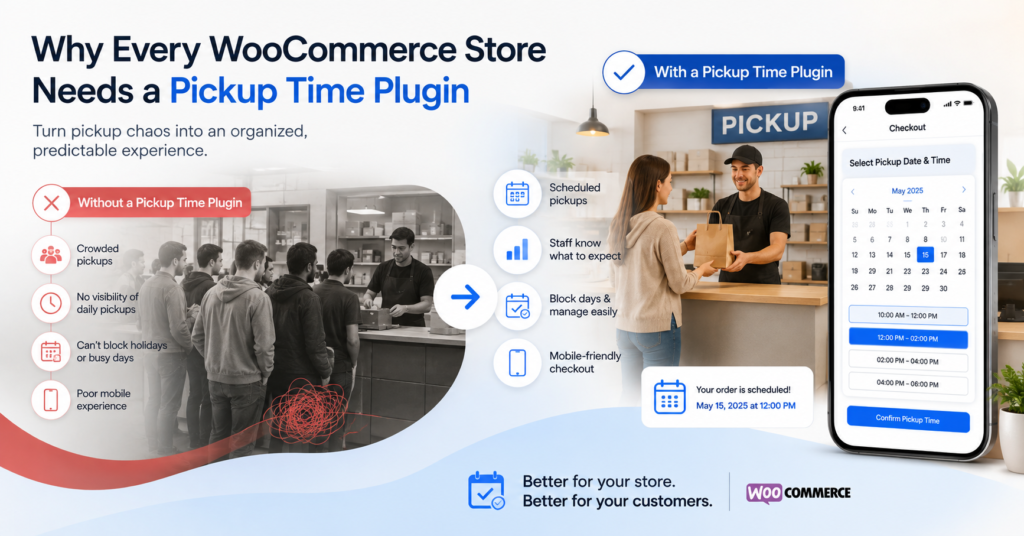
Here’s what typically goes wrong without one:
- Customers arrive before staff have even started preparing the order.
- Multiple customers show up at the same time, creating a bottleneck at the counter.
- Staff have no visibility into how many pickups are expected on a given day.
- There’s no way to block out holidays, staff shortages, or busy periods.
- Mobile shoppers — often the majority of traffic — get a checkout experience that isn’t built for their screen.
A well-built plugin removes each of these friction points by giving both the store and the shopper a shared, visible schedule.
Key Features That Make a WordPress Pickup Time Plugin Worth Using
Not all scheduling tools are built the same. A genuinely useful WordPress Pickup Time Plugin should give store owners granular control over how, when, and where pickup slots appear. Some of the standout capabilities to look for include:
- Show or hide custom time slots for specific dates only — so you can open up extra slots during a sale or hide them entirely on a slow day.
- Disable delivery and pickup individually for specific weekdays or dates — useful for stores that only offer pickup on certain days, or want to pause it around holidays.
- Set weekday-wise cutoff times for delivery and pickup — so orders placed after a certain hour automatically roll over to the next available slot, protecting your prep team from last-minute rushes.
- Fully responsive design — so you never miss a sale or a booking from your mobile audience, who now make up the bulk of online shoppers.
- Regular updates based on customer feedback — ensuring the plugin keeps improving instead of becoming outdated software sitting quietly in your plugin list.
Together, these features turn a basic checkout field into a real operations tool. You can browse the full lineup of available tools on the Plugins page to compare options for your store.
How a WordPress Pickup Time Plugin Improves the Customer Experience
Scheduling isn’t just an internal convenience — it directly shapes how customers feel about your brand. When someone can pick a pickup window that fits their day, they trust the process more and are less likely to abandon their cart at checkout.
A thoughtfully configured WordPress Pickup Time Plugin improves the shopping journey by:
- Giving shoppers visible, real-time slot availability instead of vague promises.
- Reducing “where is my order” support requests because expectations are set upfront.
- Preventing overbooking during peak hours through cutoff-time controls.
- Making the checkout flow feel modern and trustworthy, especially on mobile devices.
- Allowing repeat customers to plan around your store’s actual working rhythm, not guesswork.
If you’re weighing pickup scheduling against delivery-based options, it’s worth reading how a related WordPress Delivery Date Plugin works, since many stores end up running both side by side.
Setting Up Your WordPress Pickup Time Plugin the Right Way
Installation is only step one. The real value comes from configuring the plugin around your store’s actual capacity and workflow, not just accepting the default settings.
Before going live, it helps to:
- Map out your busiest hours and set cutoff times accordingly.
- Decide which days pickup should be available, and disable the rest.
- Test the checkout flow on a phone, not just a desktop browser.
- Communicate pickup instructions clearly on the order confirmation page.
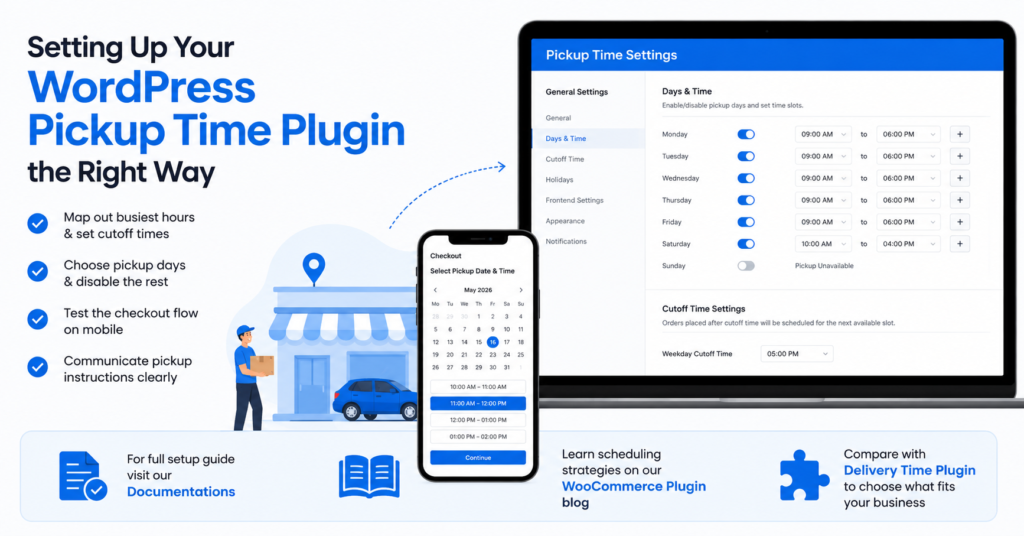
For a full walkthrough of configuration options, the Documentations section covers setup step by step, and the team behind it also breaks down broader scheduling strategy on the WooCommerce Plugin blog post. If you’re comparing this against a dedicated Delivery Time Plugin, it’s worth reading both before deciding which fits your business model.
Final Thoughts
Pickup shouldn’t be an afterthought in your WooCommerce setup. A dedicated WordPress Pickup Time Plugin gives you the structure to manage staff time, reduce customer confusion, and present a checkout experience that feels professional from the very first click. With the right cutoff rules, weekday controls, and mobile-friendly design in place, pickup scheduling stops being a guessing game — for you and for your customers.
Q. What is a WordPress Pickup Time Plugin?
It’s a WooCommerce add-on that lets customers select a specific date and time slot to collect their order in-store, instead of leaving pickup timing open-ended.
Q. Why does my WooCommerce store need a pickup scheduling plugin?
Without one, customers can arrive whenever they like, which leads to bottlenecks, unprepared orders, and unnecessary support tickets.
Q. How do cutoff times work in a WordPress Pickup Time Plugin?
Cutoff times set a deadline after which same-day slots are no longer offered, automatically pushing the customer to the next available window.
Q. Can I disable pickup on certain days?
Yes, a proper plugin lets you disable delivery and pickup individually for specific weekdays or dates, such as holidays or staff off-days.
Q. Is a WordPress Pickup Time Plugin mobile-friendly?
A well-built one is fully responsive, ensuring shoppers on phones get the same smooth scheduling experience as desktop users.
Want to see it running on a live store? Explore the plugin here or check the documentation to get started.
