 15 Days Money-back Guarantee
 Smile Safe & Secure online payment
 Dedicated Support
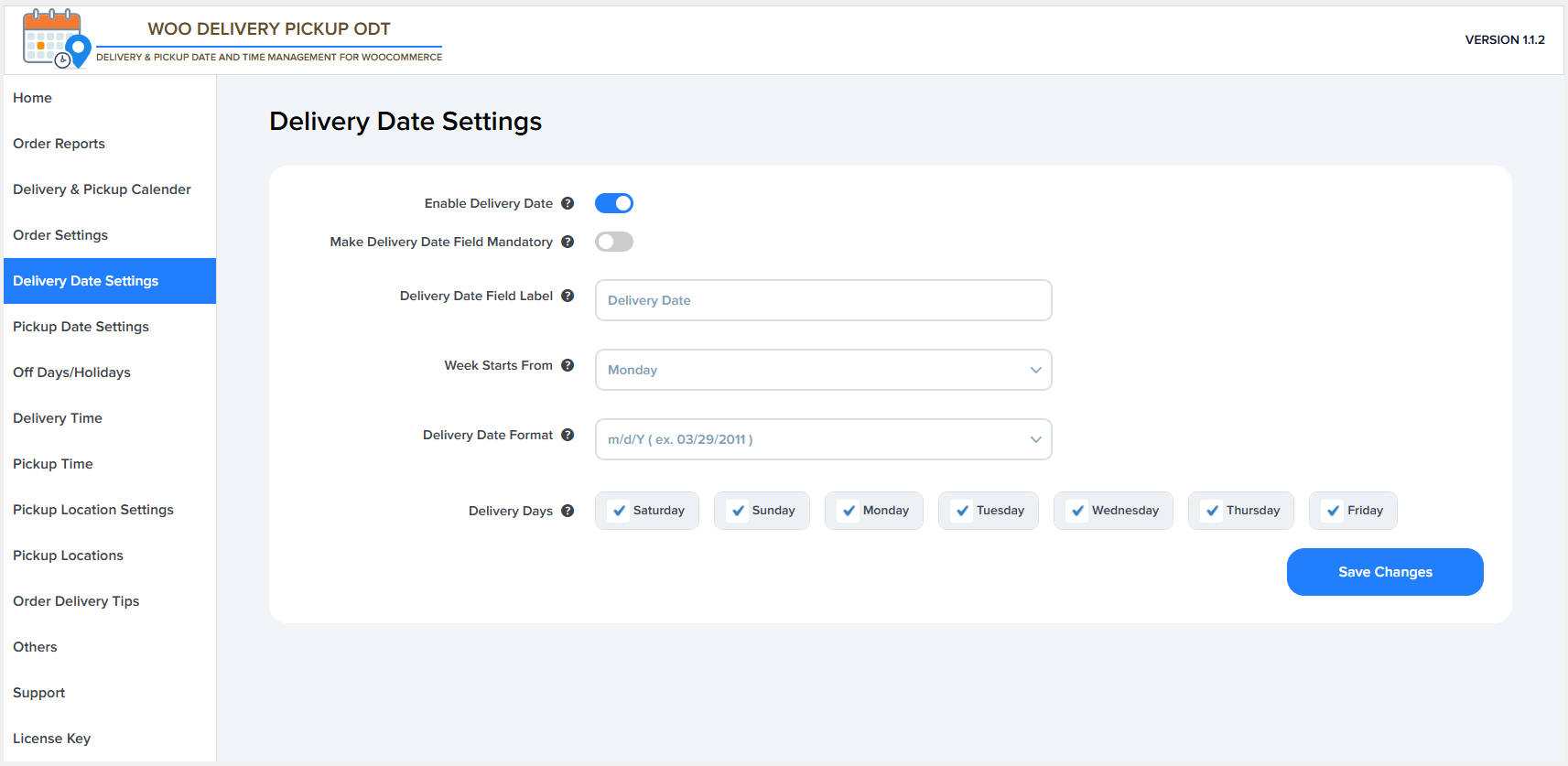
Enable Delivery Date
This option enables or disables the delivery date selection on the checkout page.
- ON – Customers can select a delivery date.
- OFF – The delivery date field is hidden from checkout.
Make Delivery Date Field Mandatory
This setting makes the delivery date selection required during checkout.
- ON – Customers must choose a delivery date to place an order.
- OFF – Delivery date selection is optional.
Delivery Date Field Label
This allows you to customize the label shown for the delivery date field on the checkout page
Example: Delivery Date, Preferred Delivery Date.
Week Starts From
This setting defines the first day of the week in the delivery date calendar.
Example: Monday or Sunday, depending on your regional preference.
Delivery Date Format
This option lets you choose how the delivery date is displayed and stored.
Example formats:
- m/d/Y → 03/29/2011
- d/m/Y → 29/03/2011
Delivery Days
This setting allows you to select which days of the week are available for delivery.
Example: Disable weekends by unchecking Saturday and Sunday.
- Checked days are available for delivery.
- Unchecked days are disabled and cannot be selected.
Save Changes
Click this button to save all delivery date settings and apply them to the checkout page.