 15 Days Money-back Guarantee
 Smile Safe & Secure online payment
 Dedicated Support
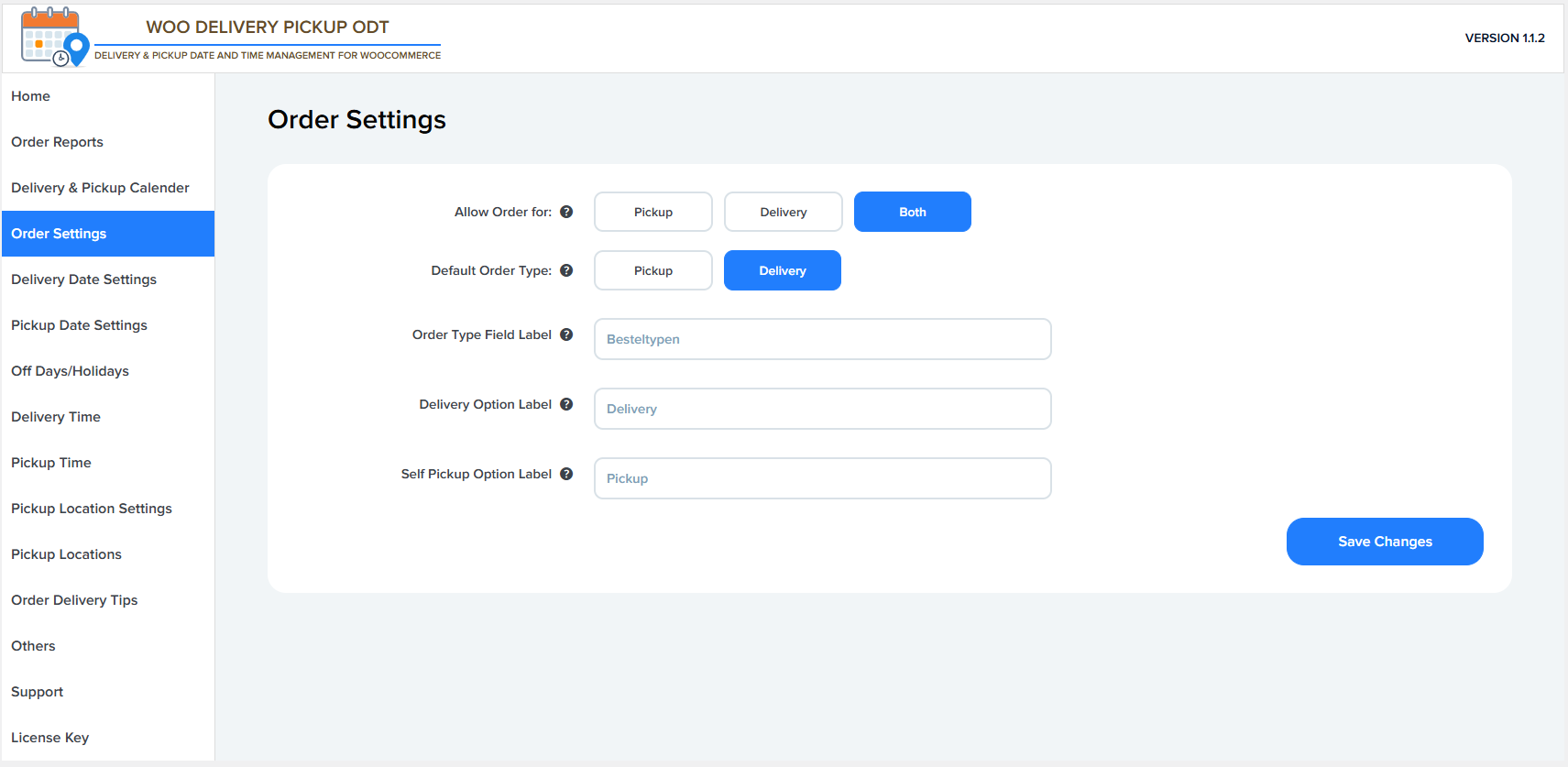
Allow Order for
This option lets you choose which order types customers can place on the checkout page:
- Pickup – Customers can only place self-pickup orders.
- Delivery – Customers can only place delivery orders.
- Both – Customers can choose between delivery and pickup.
Default Order Type
This defines which order type is selected by default on the checkout page:
- Pickup – Pickup is pre-selected when the checkout loads.
- Delivery – Delivery is pre-selected when the checkout loads.
Order Type Field Label
This setting allows you to customize the label shown to customers for selecting the order type (delivery or pickup) on the checkout page.
Example: Order Type, Besteltypen, Order Method.
Delivery Option Label
This field lets you change the text label for the Delivery option shown to customers at checkout.
Example: Delivery, Home Delivery, Doorstep Delivery.
Self Pickup Option Label
This field lets you customize the text label for the Pickup option shown to customers at checkout.
Example: Pickup, Self Pickup, Store Pickup.
Save Changes
Click this button to save all order setting changes and apply them to the checkout page.