 15 Days Money-back Guarantee
 Smile Safe & Secure online payment
 Dedicated Support
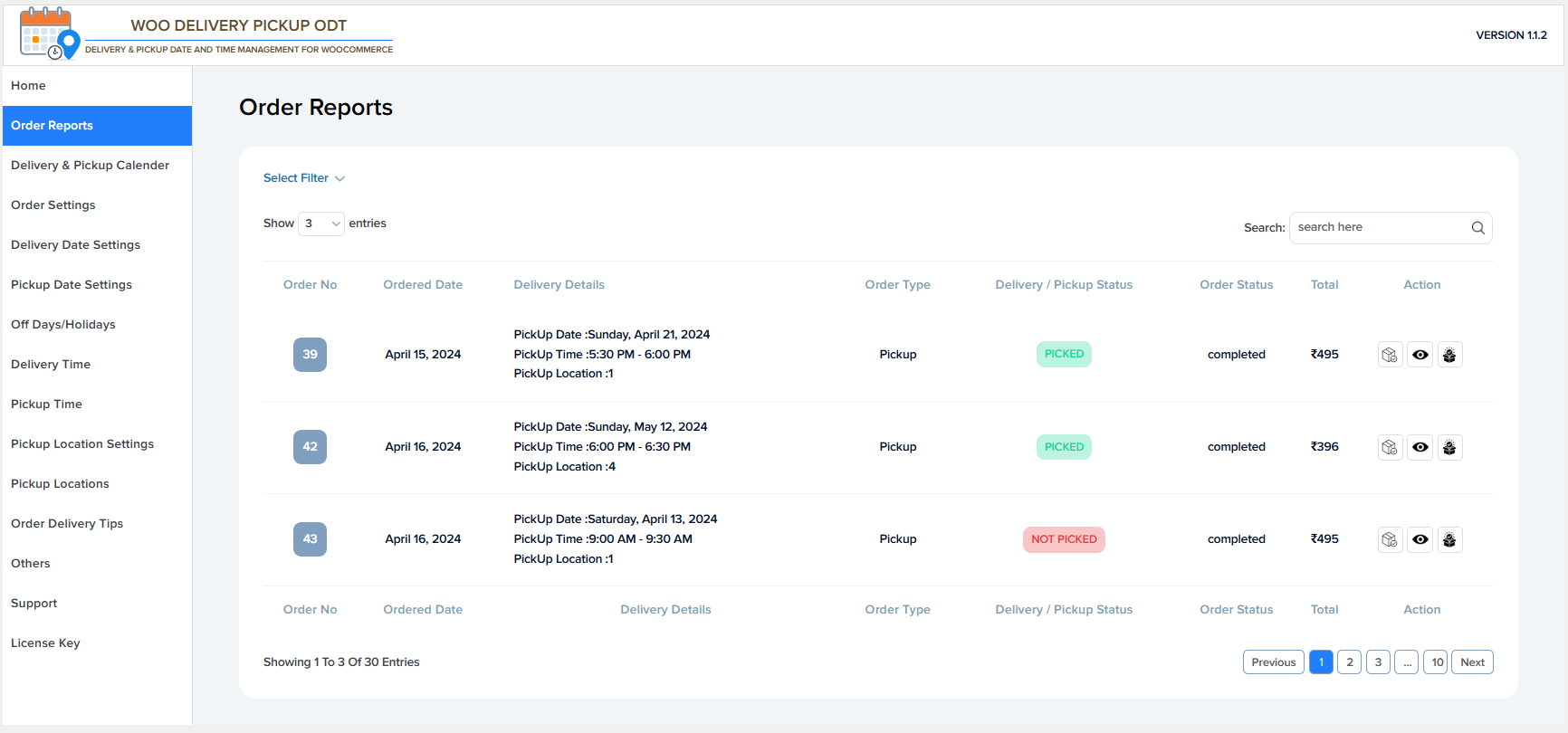
Select Filter
- Allows you to filter orders based on delivery or pickup conditions.
- Helps quickly find specific orders instead of browsing all records.
Show Entries
- Controls how many orders are displayed per page.
- Example shown: Show 3 entries
- Useful for managing large order lists.
Search
- Lets you search orders by order number or related details.
- Helps quickly locate a specific order.
🧾 Order Table – Column Descriptions
Order No
- Displays the WooCommerce order number.
- Clicking it usually opens the order details page.
Ordered Date
- Shows the date when the order was placed.
Delivery Details
- Displays delivery or pickup information, including:
- Delivery or Pickup Date
- Delivery or Pickup Time
- Pickup Location (if applicable)
- Example:
- Pickup Date: Sunday, April 21, 2024
- Pickup Time: 5:30 PM – 6:00 PM
- Pickup Location: Store 2
Order Type
- Indicates whether the order is Delivery or Pickup.
Delivery / Pickup Status
- Shows the current status of the order fulfillment.
- Common statuses:
- PICKED – Order has been picked up or delivered
- NOT PICKED – Order has not yet been picked up or delivered
Order Status
- Displays the WooCommerce order status.
- Example: Completed
Total
- Shows the total order amount.
- Example: ₹495
Action
- Provides quick action icons, such as:
- View order details
- Print order
- Download invoice
- Icons help manage orders efficiently without opening each order.
🔢 Pagination
Showing Entries Info
- Displays how many orders are currently shown.
- Example: Showing 1 to 3 of 30 entries
Page Navigation
- Allows navigation between multiple pages of orders.
- Includes Previous, page numbers, and Next buttons.